

Short answer: for most people editing 4K in 2026, the best computer for video editing is built around an NVIDIA GeForce RTX 5070 Ti (16GB), a current 8-core-plus CPU and at least 64GB of RAM. Spend more on the graphics card if you edit in DaVinci Resolve. Spend more on the CPU and RAM if you edit in Premiere Pro.
The rest of this guide explains why, gives graphics card picks from budget to no-compromise, and turns them into three complete builds. If you also want to run AI models on the same machine, read our best graphics card for AI guide. The answer there is different.
Quick picks: graphics cards for video editing
| Pick | Card | VRAM | Launch price (MSRP) | Best for |
|---|---|---|---|---|
| Best value | NVIDIA GeForce RTX 5070 Ti | 16GB | $749 | 4K in Premiere or Resolve |
| Budget | NVIDIA GeForce RTX 5060 Ti 16GB | 16GB | $429 | 1080p and light 4K |
| Step up | NVIDIA GeForce RTX 5080 | 16GB | $999 | Heavy effects and noise reduction |
| No compromise | NVIDIA GeForce RTX 5090 | 32GB | $1,999 | 6K/8K and Resolve-heavy work |
| AMD option | AMD Radeon RX 9070 XT | 16GB | $599 | Premiere users on a budget |
2026 prices are well above MSRP because of a memory-chip shortage (details below). Check the current price before you buy.
Does the graphics card matter for video editing?
It depends on your editing app. This is the single most useful thing to know before you spend money.
- DaVinci Resolve is a GPU app. Playback, color grading, noise reduction and most effects run on the graphics card. Puget Systems, the workstation builder that publishes the most detailed editing benchmarks, calls the RTX 5090 “the best card you can get for Resolve.” It says the RTX 5070 Ti and 5080 “also give terrific performance.”
- Premiere Pro leans on the CPU. Puget says your CPU “is usually going to make a much larger impact on overall system performance.” The GPU matters for GPU-accelerated effects and for decoding H.264 and HEVC footage. Clips without effects barely use it.
- Final Cut Pro runs only on Macs. See the Mac option further down.
Two more findings from Puget’s testing are worth knowing:
- NVIDIA is the safer choice. Puget reports “consistently higher performance with NVIDIA” than with comparably priced AMD cards in Premiere Pro. AMD’s RX 9070 XT does win some H.264 decode tests, so it is a reasonable budget alternative.
- One good card beats two cheaper ones. Multiple GPUs give “extremely minimal performance gains” in Premiere. In Resolve, VRAM does not add up across cards: two 8GB cards still give you 8GB.
How much VRAM do you need for video editing?
VRAM is the graphics card’s own memory. Run out, and playback stutters or effects fail. These are Puget’s published minimums by timeline resolution:
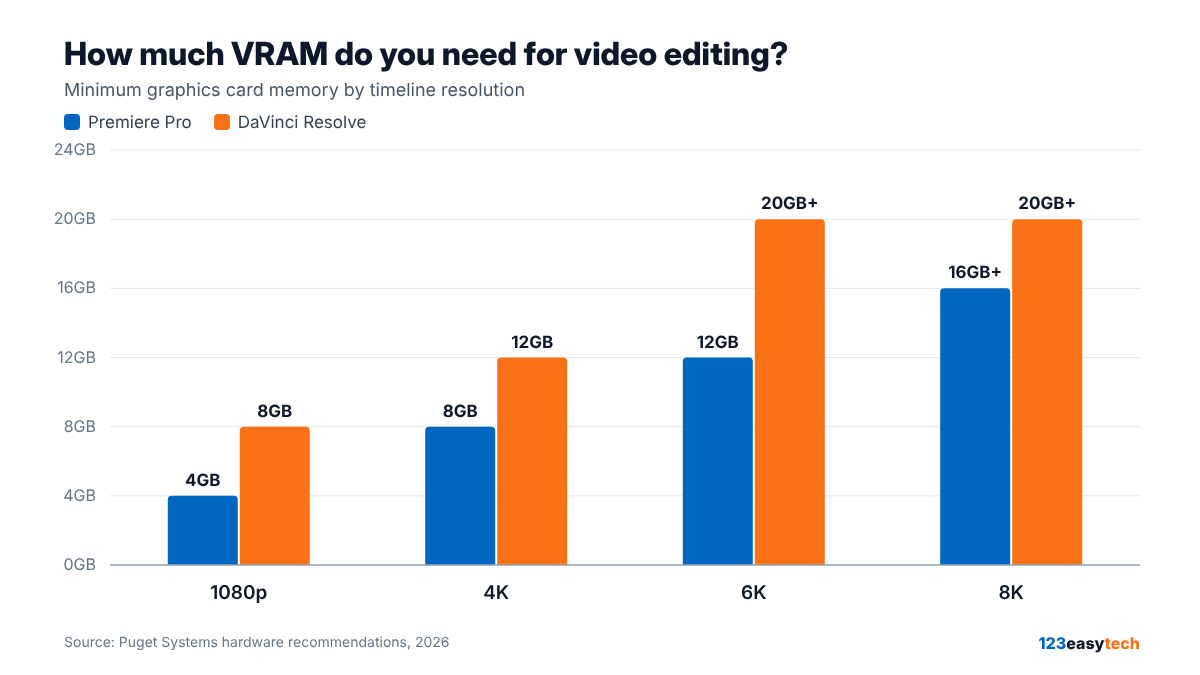
| Timeline | Premiere Pro | DaVinci Resolve |
|---|---|---|
| 1080p | 4GB | 8GB |
| 4K | 8GB | 12GB |
| 6K | 12GB | 20GB+ |
| 8K | 16GB+ | 20GB+ |
Our rule of thumb: buy 16GB even if you edit only 1080p or 4K today. Resolve’s noise reduction and masking tools use the same memory as your timeline, and 16GB cards don’t cost much more than 8GB versions of the same chip. Avoid 8GB cards for editing in 2026.
The best graphics cards for video editing in 2026
1. Best value: NVIDIA GeForce RTX 5070 Ti (16GB)
Launch price: $749 · Reported street price (early Oct 2026): about $1,120–$1,170
The RTX 5070 Ti has the same video encode and decode engines as the more expensive RTX 5080, and the same 16GB of memory. The 5080 is only about 14–17% faster in editing tests. For most people editing 4K, that gap isn’t worth several hundred dollars.
Like all RTX 50-series cards, it is the first consumer generation that can hardware-decode 10-bit 4:2:2 H.264 and HEVC. That’s the format many recent mirrorless cameras record. Check that your editing app has been updated to use it: Puget noted that Premiere Pro hadn’t been at the 50-series launch.
Check RTX 5070 Ti price on Amazon
2. Budget: NVIDIA GeForce RTX 5060 Ti 16GB
Launch price: $429 · Reported street price: about $780–$830
The cheapest current NVIDIA card with 16GB. It covers 1080p comfortably and handles 4K in Premiere Pro. Buy the 16GB version; the 8GB model is not enough for modern editing.
Check RTX 5060 Ti 16GB price on Amazon
3. Step up: NVIDIA GeForce RTX 5080 (16GB)
Launch price: $999 · Reported street price: about $1,650
Puget calls it “a solid option.” It makes sense if you lean heavily on Resolve’s noise reduction, Fusion or stacked GPU effects, and the price gap to the 5070 Ti is small where you shop. It has the same 16GB as the 5070 Ti, so it doesn’t help with 6K or 8K memory limits.
Check RTX 5080 price on Amazon
4. No compromise: NVIDIA GeForce RTX 5090 (32GB)
Launch price: $1,999 · Reported street price: $6,500 and up
The fastest card for editing. Puget measured it at roughly the performance of three previous-generation RTX 4090s in Resolve. It is the only consumer card that meets the 20GB+ recommendation for 6K and 8K comfortably. It draws up to 575W, so plan for a 1000W+ power supply.
The catch in 2026: AI buyers are taking most of the supply, and street prices are more than three times MSRP. Unless you edit 6K/8K or Resolve is your income, an RTX 5070 Ti or 5080 is the better use of the money right now.
Check RTX 5090 price on Amazon
5. AMD option: AMD Radeon RX 9070 XT (16GB)
Launch price: $599
A fair choice for Premiere Pro users, where it wins some H.264 decode tests. In Resolve, Puget’s results favor NVIDIA at the same price. AMD raised memory prices to its card makers on October 1, 2026, so Radeon prices are climbing too.
Check RX 9070 XT price on Amazon
Why graphics cards cost so much in 2026
Memory makers are shifting production to chips for AI data centers. That has pushed up the price of the memory used in graphics cards and in your PC’s RAM. A few things follow from that:
- Most cards sell well above their launch price. The RTX 5090 is the extreme case.
- NVIDIA’s rumored RTX 50 “Super” cards, with more memory, have not been announced. The latest reports point to early 2027 at the earliest.
- Our advice: if you need a computer now, buy what you need now. If your current machine still works, waiting a few months is reasonable, but nobody can promise prices will fall.
Three complete builds for video editing
These are component guidelines, not exact parts lists. RAM and storage follow Puget’s recommendations.
| Build 1: 1080p and light 4K | Build 2: 4K, serious work | Build 3: 6K/8K and Resolve-heavy | |
|---|---|---|---|
| Graphics card | RTX 5060 Ti 16GB | RTX 5070 Ti (or 5080) | RTX 5090 (5080 if you can’t find one) |
| CPU | Intel Core Ultra 7 270K Plus | Intel Core Ultra 7 270K Plus or AMD Ryzen 9 9950X | AMD Threadripper 9970X |
| RAM | 64GB | 96GB | 128–192GB |
| Storage | 1TB NVMe (system) + 2TB NVMe (projects and media) | Three drives: system, projects, media cache | Three NVMe drives, plus a NAS or large drive for archive |
| Who it’s for | YouTube, social video, phone and drone footage | Client work, multicam, color grading | RAW footage, 8K, heavy noise reduction |
Why these CPUs? Puget recommends the Intel Core Ultra 7 270K Plus for H.264 and HEVC footage, the formats most cameras and phones record, because of Intel’s built-in Quick Sync decoding. AMD’s Threadripper 9000 series leads most other editing workloads. Ryzen 9000 chips trail “but not by a wide margin.”
Why so much RAM? Puget’s minimums are 64GB for 1080p, 96GB for 4K, 128GB for 6K and 192GB for 8K. If you also keep a browser, Photoshop or After Effects open while editing, go higher.
Storage tip: don’t edit straight from a USB drive. Copy footage to an internal NVMe drive first. Puget names editing from external drives as a common cause of problems.
The Mac option
If you edit in Final Cut Pro, or just prefer macOS, Apple’s Mac Studio with the M5 Max chip starts at $2,499. The M5 Ultra version starts at $5,499. It’s a quiet, compact alternative to a Windows tower. You can’t upgrade the graphics or memory later, so buy the memory you’ll need on day one.
Editing and AI on the same computer?
If you want to run local AI models (chatbots, transcription, image generation) on your editing PC, the priority changes. For AI, VRAM capacity matters more than raw speed, and a 16GB card limits which models you can run. We cover that in our best graphics card for AI in 2026 guide.
FAQ
Is an RTX 5060 Ti good enough for 4K video editing?
The 16GB version is, for Premiere Pro and for lighter 4K work in Resolve. If you use heavy noise reduction in Resolve, step up to an RTX 5070 Ti.
Is 32GB of RAM enough for video editing?
It works for short 1080p projects. Puget’s minimum recommendation for editing is 64GB, and 96GB for 4K.
NVIDIA or AMD for video editing?
NVIDIA for DaVinci Resolve. Either works for Premiere Pro, where AMD’s RX 9070 XT is competitive on price.
Is my current computer the problem?
Before buying, try our free browser tools to check your display, keyboard and mouse. Then check your editing app’s own performance or GPU settings to see whether the graphics card is the bottleneck.
How we chose
We did not benchmark these cards ourselves. The picks are based on Puget Systems’ published hardware recommendations for Premiere Pro and DaVinci Resolve, manufacturer specifications and launch prices, and street prices reported by technology publications in early October 2026. We will update this page when prices or the lineup change. See how we work and our affiliate disclosure.
Sources: Puget Systems: Premiere Pro hardware recommendations · Puget Systems: DaVinci Resolve hardware recommendations · The Post Flow: GPU tiers and street prices (Oct 2026) · Tech Times: GPU prices, Oct 12 2026 · eTeknix: RTX 50 Super status · Apple: Mac Studio M5
As an Amazon Associate, 123easytech earns from qualifying purchases. Buying through our links costs you nothing extra.
